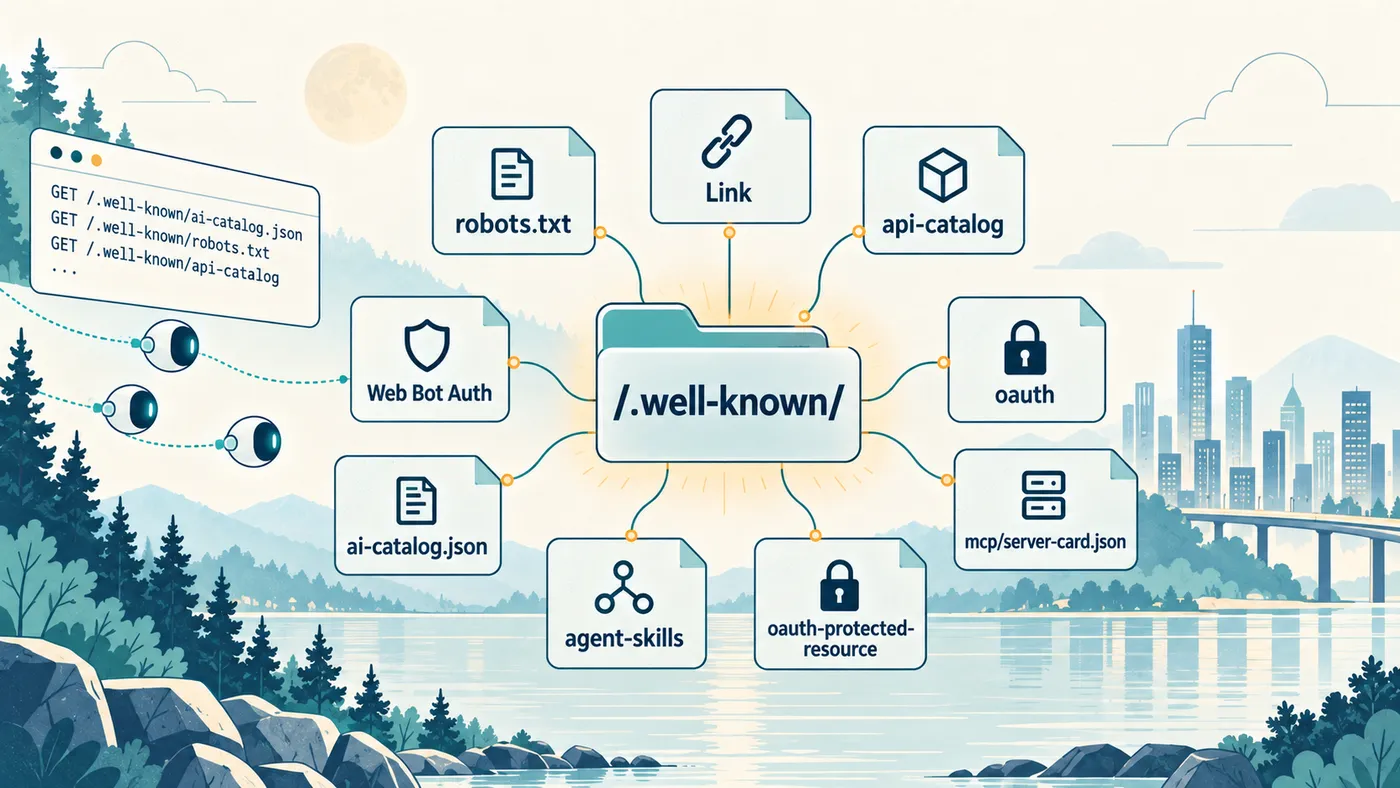
The .well-known Explosion: A Field Guide to the New Agent Standards
Look at any site’s logs at three in the morning and you’ll find visits that don’t fit: dozens of pages read in seconds, not a single click, not one image downloaded, and they’re gone. Not people. Not the usual crawlers either — those only fetched content for a search engine. These are AI agents (programs that arrive to read and to act) and there are more of them every month.
That visitor doesn’t see your site. It doesn’t render the design, doesn’t follow the navigation, doesn’t fall for the copy. And it still decides things about you: how much of your content to use, how to cite you, whether to become a customer or move on. The question of this guide is simple: where do you leave instructions for someone who doesn’t come in through the front door?
The answer has been working for a decade, and you’ve already used it a hundred times without knowing. When you land on an unknown page and click “Sign in with Google,” the button works because Google (and Apple, and Microsoft) publish their instructions in the same folder, at the same path: /.well-known/. The site knows Google’s domain; that’s enough, because the rule says where everything else lives. RFC 8615 (RFCs are the documents Internet rules are written in) reserved that folder for exactly this: whatever a site wants the world to know up front, lives here. That’s where openid-configuration lives, and security.txt for vulnerability reports, and the ACME challenges that renew your certificates while you sleep.
Practical detail, because someone always tries it: the folder doesn’t open or list. Ask your browser for google.com/.well-known/ and you’ll get a 404: it’s not a folder on your computer, it’s a URL convention. Each standard defines the exact filename that lives inside, and each domain publishes only its own: Google’s sign-in instructions live at accounts.google.com/.well-known/openid-configuration, not google.com. There it does answer: raw JSON, in plain sight.
What’s new isn’t the folder. It’s who moved in. Through 2025 and 2026 it filled up with files written for the three-in-the-morning visitor, and this guide walks all of them, in the order you’d ship them on a new site: cheapest file first.
Where the ground stands today
Before we go file by file, a portrait of the ground. It moves fast. Four things defined the year, all verified when I wrote this, in September 2026:
- The scorecard grew. isitagentready.com, Cloudflare’s scoreboard (the web infrastructure company) measuring how agent-ready a site is, went from 8 checks to 22, grouped into five axes: how easy you are to find, how accessible your content is, how you control bots, which protocols you publish, and commerce.
- Payments arrived. Until yesterday, the agent only read; now it buys too. Four formats compete for its wallet (x402, UCP, MPP, and ACP), a whole scorecard axis, brand new.
- Web Bot Auth got real. It went from a roadmap promise to a scorecard check, and it now has its own working group at the IETF (the body that standardizes Internet protocols).
- MCP shipped the 2026-07-28 spec. The protocol agents use to talk to external tools got rewritten stateless: no opening handshake, no sessions to remember.
A promise before we start: if you don’t code, this is for you too. Stay for each section’s “what it is” and “why it exists”: that’s where the narrative lives, and the code can wait. If you do, every section is self-contained: what it is / why it exists / minimum valid example / common pitfalls / where to learn more. Skip around.

1. robots.txt Content Signals
The first conversation with whoever arrives: before they read a single word of yours, they find out what they may do with it.
What it is
A single line in robots.txt — the small text file every site leaves at its root to talk to the programs that walk it — declaring your preferences for AI use of your content: training, search indexing, use as input to a generated answer.
Why it exists
robots.txt traditionally told crawlers whether they could fetch. Content Signals extends that to what they can do with what they fetch. It formalizes the difference between “please index me” and “please don’t train on me”: a distinction noindex and allow/disallow can’t express.
Minimum valid example
User-agent: *
Content-Signal: ai-train=no, search=yes, ai-input=yes
All three signals (ai-train, search, ai-input) must appear. A fourth is on the way: use, which declares how content gets consumed (immediate, reference, or full) — it already shows up in the blocks Cloudflare manages automatically.
Common pitfalls
- Placing
Content-Signal:outside aUser-agent:block — invisible to crawlers. - Omitting one of the three signals, or writing
ai-train=no,search=yeswith no space after the comma. - The two-layer trap. If you turn on Cloudflare’s managed Content Signals, your
robots.txtends up with two blocks writing the same directive — theirs on top, yours below. On cabuya.org,ai-train=no(managed) andai-train=yes(mine) coexist. I found exactly that while preparing this post, and I don’t have a clean answer: every crawler resolves duplicate blocks its own way. What I do know is that an ambiguous policy is worse than a policy you dislike. Decide which layer owns the signal.
Where to learn more
- contentsignals.org
- IETF draft
- Cloudflare’s AI Crawl Control
2. Link response headers (RFC 8288)
A sign on every response: “catalog over there, instructions over there” — without anyone having to open the HTML.
What it is
Every response a site serves travels in two parts: the body — what you see — and the headers, a few lines of metadata that travel first, like the data on an envelope. A Link header is a line on that envelope: it points at machine-readable companion documents. Think of it as the tags HTML uses to say “my stylesheet lives over there,” promoted to the envelope — a client that never opens the body still learns where everything is.
Why it exists
Agents don’t always render the page — sometimes they request headers only (a HEAD: the equivalent of asking “what’s in there?” without downloading anything) and decide from that. Link headers let them discover your API catalog, MCP server card, or skills index without fetching the HTML.
Minimum valid example
Link: </.well-known/api-catalog>; rel="api-catalog"Useful rel values: api-catalog, service-desc, service-doc, describedby. One is enough; several are fine. Here’s cabuya.org’s in production, served on every response:
Link: </.well-known/api-catalog>; rel="api-catalog"; type="application/linkset+json",
      </openapi.json>; rel="service-desc"; type="application/openapi+json",
      </llms.txt>; rel="describedby"; type="text/plain"
Common pitfalls
- Missing angle brackets around the URL, or the semicolon before
rel=. - Pointing
relat a URL that returns 404. - Emitting them only on
/and not on language subpaths like/es/.
Where to learn more
- RFC 8288 (Web Linking)
- RFC 9727 §3 (rel registration for
api-catalog) - IANA Link Relations registry
3. API Catalog (RFC 9727 + Linkset RFC 9264)
Everything your site knows how to do, listed in one file anyone can read without asking you a thing.
What it is
A JSON document (the text format machines read effortlessly) at /.well-known/api-catalog, listing the site’s public APIs: the things a program can ask for (data, searches, results). Each entry links its machine-readable description (OpenAPI — the standard format for describing APIs) and its human documentation.
Why it exists
A single pointer to your OpenAPI spec isn’t enough — larger sites have several APIs, each with different docs. The catalog uses the linkset format (a standardized JSON list of links) so any tool consumes all those descriptions the same way.
Minimum valid example
{
  "linkset": [
    {
      "anchor": "https://api.example.com/users",
      "links": [
        { "rel": "service-desc", "href": "https://api.example.com/openapi.json" },
        { "rel": "service-doc", "href": "https://api.example.com/docs" }
      ]
    }
  ]
}
Cabuya.org’s catalog (trimmed) points at the OpenAPI spec, the docs, and the protocol’s JSON Schemas — three anchors for three surfaces:
{
  "linkset": [
    {
      "anchor": "https://cabuya.org/api/validate",
      "service-desc": [{ "href": "https://cabuya.org/openapi.json" }],
      "service-doc": [{ "href": "https://cabuya.org/developers/validator.md" }]
    }
  ]
}
Common pitfalls
- Wrong Content-Type. It must be
application/linkset+json, notapplication/json. This one fails silently: the file looks perfect in a browser and no client accepts it. - An empty
linksetarray, or missingservice-desc/service-doc. - Linking at an OpenAPI spec you haven’t actually written.
Where to learn more
- RFC 9727 (The Linkset API Catalog)
- RFC 9264 (Linksets) — Appendix A of 9727 has full worked examples
4. OAuth Authorization Server Metadata (RFC 8414) / OIDC Discovery
Here it is again: the button story near the top of this post is this section, seen from the other side of the door.
What it is
Publishing your OAuth authorization server’s configuration at a fixed path (OAuth is the standard that lets one app ask another for permissions without sharing passwords) so clients discover endpoints programmatically.
Why it exists
No agent can ship from the factory knowing your door’s addresses — the endpoints: the exact paths where your site accepts each kind of request; every site has its own. With this metadata, one request is enough to know exactly how to start authenticating against you.
Minimum valid example
{
  "issuer": "https://your-domain.com",
  "authorization_endpoint": "https://your-domain.com/authorize",
  "token_endpoint": "https://your-domain.com/token",
  "jwks_uri": "https://your-domain.com/.well-known/jwks.json",
  "grant_types_supported": ["authorization_code"],
  "response_types_supported": ["code"]
}
Six required fields, served at /.well-known/oauth-authorization-server or /.well-known/openid-configuration. The version cabuya.org serves declares exactly what exists: one credential, and what it buys:
{
  "issuer": "https://cabuya.org",
  "token_endpoint": "https://cabuya.org/oauth/token",
  "grant_types_supported": ["client_credentials"],
  "scopes_supported": ["validate:extended"],
  "service_documentation": "https://cabuya.org/auth.md"
}
Translation: these files hand the agent a map of the door — where to ask for a token and what it unlocks. The key remains your business.
Common pitfalls
- Publishing endpoints that don’t exist. On a site with no real OAuth, the right move is documenting reserved paths: a
_commentfield is spec-compliant. - Missing one of the six required fields.
- Counting on dynamic client registration (RFC 7591) forever: the MCP 2026-07-28 spec deprecated it for new implementations, with removal after summer 2027. If you’re starting out, prefer pre-registered clients.
Where to learn more
- RFC 8414 (OAuth 2.0 Authorization Server Metadata)
- OpenID Connect Discovery 1.0
- Cloudflare’s Managed OAuth for Access
5. OAuth Protected Resource Metadata (RFC 9728)
The other half of the conversation: not “where do I get a key” but “what does that key open here.”
What it is
The companion document to the previous one: it declares which resources are protected and which authorization servers issue tokens for them.
Why it exists
Authorization server metadata answers “where do I get a token?” Protected resource metadata answers “what can I do with one here?” An agent that discovers both can plan the whole flow.
Minimum valid example
{
  "resource": "https://your-domain.com",
  "authorization_servers": ["https://your-oauth-provider.com"]
}
Two required fields. On a content site with no protected resources, declaring the resource to be yourself is a deliberate redundancy the spec allows. That’s how cabuya.org serves it:
{
  "resource": "https://cabuya.org",
  "authorization_servers": ["https://cabuya.org"],
  "scopes_supported": ["validate:extended"]
}
Common pitfalls
- Listing authorization servers that don’t exist or aren’t reachable.
- Wrong path: it must be exactly
/.well-known/oauth-protected-resource, no.jsonextension. - Forgetting
WWW-Authenticate: resource_metadataon 401 responses — it’s how an agent that arrived unknowing discovers the document.
Where to learn more
- RFC 9728 (OAuth 2.0 Protected Resource Metadata)
6. MCP Server Card (SEP-1649)
Agents don’t just read sites — they use tools. This card says where yours live.
What it is
A JSON document at /.well-known/mcp/server-card.json declaring your site an MCP-compatible surface — which capabilities you serve and where to connect.
Why it exists
MCP (Model Context Protocol) became the shared language agents use to talk to external tools. The server card makes an MCP site discoverable at a known path, without hand-configuring every agent.
What changed in the spec
The 2026-07-28 version rewrote the transport: MCP is now stateless — no initialize handshake (the greeting two programs exchange before talking), no Mcp-Session-Id, with new headers (Mcp-Method, Mcp-Name) so gateways and WAFs (the filters that inspect network traffic) can decide without reading the request body. The HTTP+SSE transport is deprecated. The card itself is still a proposal (SEP-1649), now joined by an IETF draft for an mcp:// URI scheme. The standard is settling; the details still move.
Production example
{
  "serverInfo": { "name": "cabuya-org", "title": "cabuya.org site tools", "version": "0.1.0" },
  "transport": { "type": "streamable-http", "endpoint": "https://cabuya.org/mcp" },
  "capabilities": { "tools": {} },
  "tools": [
    { "name": "validate_cabuya_feed" },
    { "name": "read_cabuya_page_as_markdown" }
  ],
  "authentication": { "type": "none" }
}
Note the detail: the SEP defines capabilities as a simple list of words; cabuya.org serves an object (name/value pairs) and the scanner passes both. We’re in that awkward stage where the spec, the scanners, and production don’t all say the same thing yet. Write what the SEP asks for and tolerate what you find.
Common pitfalls
- Wrong nested path — it’s
/.well-known/mcp/server-card.json, not/.well-known/mcp.json. - An empty
capabilitiesarray. - Declaring capabilities your site doesn’t serve over MCP.
Where to learn more
- Model Context Protocol — spec
- SEP-1649 / server card
- The next generation of MCP (Cloudflare, on 2026-07-28)
7. Agent Skills Discovery (Cloudflare RFC v0.2.0)
A tool gets called. A skill gets learned. This index says where your site’s knowledge lives.
What it is
A JSON index at /.well-known/agent-skills/index.json listing skills — documented procedures an agent can read, keep, and follow — each pointing at its SKILL.md with a SHA-256 hash: the cryptographic fingerprint of the bytes actually served.
Why it exists
A tool is something an agent can call. A skill is composable knowledge on top: instructions the agent reads and follows when it needs them. The index standardizes where to find them, and the hash verifies they didn’t change in transit.
Minimum valid example
{
  "$schema": "https://schemas.agentskills.io/discovery/0.2.0/schema.json",
  "skills": []
}
An empty skills[] is valid. Cabuya.org’s lists two, with hash and license (trimmed):
{
  "skills": [
    {
      "name": "publish-a-cabuya-feed",
      "type": "skill",
      "description": "Publish emergency-aid data as a conforming feed and measure it with the public validator.",
      "url": "https://cabuya.org/.well-known/agent-skills/publish-a-feed/SKILL.md",
      "sha256": "7777afc5fcf6c2f2...",
      "license": "CC0-1.0"
    }
  ]
}
Did you catch it? The canonical spec calls the field digest with a sha256: prefix; production sometimes names it sha256 outright. The scanner accepts both. If you’re writing a client, tolerate the variance — it’s a draft, and drafts mutate.
Common pitfalls
- Skill names with uppercase or spaces (lowercase, digits, hyphens; 1–64 characters).
- A hash computed on local bytes instead of the bytes actually served — they differ if your server re-compresses content.
- Confusing
type: "skill-md"(single file) withtype: "archive"(a multi-file.tar.gz).
Where to learn more
8. WebMCP (browser)
Everything so far was for agents arriving from outside. What if the agent is already inside your page?
What it is
A browser API — navigator.modelContext.registerTool() — that lets a page publish tools an agent running in the browser itself can call. MCP over a page context instead of a server.
Why it exists
When the agent runs in the user’s browser (an extension, an integrated assistant), it has full access to the session — cookies, state, everything. WebMCP gives the page a way to say “here are the actions I expose” without turning them into public APIs.
Minimum valid example
navigator.modelContext.registerTool({
  name: 'search',
  description: 'Search site content',
  inputSchema: {
    type: 'object',
    properties: { q: { type: 'string' } },
    required: ['q'],
  },
  execute: async ({ q }) => { /* ... */ },
}, { signal: abortController.signal });
Four properties per tool: name, description, inputSchema, execute. Pass the AbortController signal so the registration is revoked on unmount.
Common pitfalls
- Registering tools in a script that runs late — after the scanner took its picture of the page. Make sure the registration happens on load, not at some deferred moment.
- Exposing write operations without explicit consent. Keep the surface read-only at first.
- An
inputSchemathat isn’t valid JSON Schema.
Where to learn more
9. Web Bot Auth (no longer a bonus)
Anyone can knock. This is how an agent proves who they are when they do.
What it is
A directory at /.well-known/http-message-signatures-directory holding the public keys agents use to sign their HTTP requests. It lets a site verify “this request really comes from the agent it claims to be.”
Why it exists
Bot identification is IP-based and User-Agent-based, both spoofable. Web Bot Auth proposes cryptographic signatures so agents can prove their identity. This went from scorecard roadmap to a real check (asking for a JWKS with at least one key), and it now has its own working group at the IETF. Cloudflare’s verified bots program already verifies with cryptography, not IP lists.
What the check asks for
- A JWKS (a JSON set of public keys) at the well-known path.
- Signed requests from your bot, including
Signature-AgentandSignature-Inputheaders.
Where to learn more
- Web Bot Auth on Cloudflare
- The age of agents (the origin, August 2025)
10. What arrived last: payments, agent-to-agent, DNS
The scorecard runs 22 checks; these five are the newest. One line each, so you know they’re there:
- A2A Agent Card —
/.well-known/agent-card.json: agent-to-agent discovery, for agents looking for each other (spec). - ARD —
/.well-known/ai-catalog.json: a unified manifest listing your MCP servers, A2A agents, skills, and APIs in one document (spec, still v0.9). - DNS-AID — discovery over DNS (the system that turns domain names into addresses):
SVCBrecords under your domain’s_agentsnamespace, so an agent finds your endpoints before making its first HTTP request. - auth.md — a
/auth.mdat the root explaining your authentication in prose, for agents (the proposal). - Commerce — four formats competing for the agent’s wallet: x402 (from Coinbase, native HTTP payments with a 402 response), UCP, MPP, and ACP.
The scorecard started with 8 checks; today it’s 22. The folder is still exploding.
11. Cabuya: born with the front desk open
Cabuya is an open interoperability protocol for emergency-aid applications that I built. The problem is simple: in every emergency, teams build their own maps and directories, sometimes for the same city, and the data stays trapped inside each app. Cabuya defines a common format for the places aid runs on (shelters, collection centres, service points) and a fixed path to publish them. Any app can read what any other app published. Person-level data is out by design, not by good intentions. Everything is CC0 — there’s nobody to ask for permission.
Why should any of this matter to a newborn protocol? Because a new site has no inbound links, no reputation, no history. A new protocol has nothing to recommend it except being easy to find for whoever arrives with no context. A well-attended front desk isn’t a luxury — it’s the only distribution you have on day one.
So cabuya.org serves the whole family: Link headers on every response; the API catalog with the correct Content-Type pointing at the OpenAPI spec, the JSON Schemas, and the docs pages; the MCP server card with two real tools (validate a feed, read any page as Markdown) over stateless transport with no authentication; the skills index with two entries (an adoption guide and a publishing guide) with their hashes and license; OAuth metadata that declares without shame that the one credential buys a bigger validation rate tier, nothing else; and every page on the site with a .md twin, because an agent that prefers Markdown shouldn’t have to parse HTML.
There’s a twist I like more than everything else: the protocol itself lives in the folder. A Cabuya publisher declares its manifest at /.well-known/cabuya.json. The folder that describes the protocol also executes it. That’s the deep pattern of this whole guide: when you design a protocol, the folder lends you a drawer of your own.
Measured, not declared (house rule): the isitagentready API returns level 5, Agent-Native, for cabuya.org: all 22 checks pass or count as neutral, except the A2A card and the ARD catalog, which the site doesn’t serve.
And the traffic? Honestly: none that I can measure. I think publishing this family is a correct, cheap bet — not a won lottery; the formats are still competing with each other and none has a monopoly on how agents will arrive. But an afternoon of work keeps you in the conversation, and not publishing keeps you out of it. The cost is asymmetric.
12. The guide that proves itself
This guide’s last example isn’t out there on the internet: it’s the tab you’re reading in. The domain in your address bar serves almost the entire family you just walked: Content Signals, Link headers, the API catalog, OAuth metadata, the MCP card, the skills index, WebMCP, and the section 10 ARD manifest. This very site you’re reading. The scorecard measures it at level 5, Agent-Native. And yes: the three-in-the-morning visitor from the opening finds its instructions on this domain every night.
Try it yourself. The folder still won’t list (that part hasn’t changed), but every file opens. For one minute, be the agent:
| Path | What it finds |
|---|---|
/.well-known/ai-catalog.json |
The section 10 ARD manifest: eight resources — the MCP server, the public API, llms.txt, auth.md |
/.well-known/api-catalog |
The RFC 9727 catalog: OpenAPI, the LLM guide, the /developers portal |
/.well-known/mcp/server-card.json |
The MCP card: search posts, list series, open one by slug |
/.well-known/agent-skills/index.json |
The skills index |
/.well-known/oauth-authorization-server |
OAuth metadata — the honest stub, _comment in plain sight |
/.well-known/oauth-protected-resource |
The protected resource that points at itself |
Raw JSON, in plain sight — like Google’s openid-configuration, except this one describes a blog, not credentials.
And a couple of details I like. The page you have open registered three WebMCP tools in your browser on load (search_blog, list_series, open_post), so if your browser already speaks navigator.modelContext, I didn’t tell you about section 8; I’m demonstrating it. The section 10 DNS record exists here too: _index._agents.xergioalex.com answers before the first HTTP request is ever made. And in robots.txt, a single layer writes the Content Signals — mine — without the version conflict I found on cabuya.org.
Measured, not declared (house rule, again): of the 22 checks, xergioalex.com passes 15; six count as neutral (Web Bot Auth and the whole commerce axis; this is not a store) and one fails: the A2A card. Cabuya.org fails two, because it doesn’t serve the ARD catalog either. Yes: the personal blog is one check ahead of the protocol I built specifically to be found. Standards don’t ask who you wrote for.
I owed you the honest part: several of the traps I listed here, I stepped on in this domain, before I knew they were traps. The OAuth _comment I recommended in section 4 runs in production here because this is where I needed it. The traps in this guide aren’t theory; they’re my field notes.
An afternoon is all it takes
Everything you just read ships in one afternoon. Content Signals are one line in robots.txt; Link headers are another; the six JSON files in the folder mostly weigh under 1 KB. The OpenAPI spec is the only one that takes real time, budget half a day, and the WebMCP bridge can wait for the following weekend: read-only the first time, like mine.
You don’t need to read a single RFC end to end either. Read each SKILL.md at isitagentready.com/.well-known/agent-skills/, copy its payload, adjust the URLs. The RFCs explain why each field exists; the SKILL.md tells you what to put there. Somebody already walked the long road for you.
The second audience
For thirty years we built the web for one audience: human eyes. Everything (the design, the navigation, the copy) existed to be seen. Then, at some point, without announcement, the audience doubled. Readers arrived who will never see your design. They just read — and they decide.
The folder has been receiving machines for decades. robots.txt was tending crawlers before the browser you’re using now existed; openid-configuration made the sign-in button this guide opened with possible. What’s new isn’t machines arriving — it’s that, for the first time, they arrive to read on their own and to act on what they read. That’s a visitor. And visitors get instructions left for them.

I don’t know which of these formats will survive. But the internet was always the same thing: agreements about where to leave things so the other party finds them. We’re just furnishing the new drawer. At under a kilobyte a file, your site speaks to whoever arrives — human or not — in their own language.
I’ll keep building.
Resources
- RFC 8615 — Well-Known URIs
- RFC 8288 — Web Linking
- RFC 9264 — Linksets
- RFC 9727 — API Catalog
- RFC 8414 — OAuth Authorization Server Metadata
- RFC 9728 — OAuth Protected Resource Metadata
- Model Context Protocol · SEP-1649 server card · IETF mcp:// draft
- Cloudflare Agent Skills Discovery RFC · agentskills.io
- WebMCP spec
- Content Signals · Web Bot Auth (IETF WG)
- isitagentready.com
- cabuya.org — the protocol and its public validation API

Sergio Alexander Florez Galeano
CTO & Co-founder at DailyBot
Colombian software engineer and entrepreneur (DailyBot, YC S21). I write about AI agents, developer tools, startups, and the craft of software engineering — and I build this site in the open at XergioAleX.com.
Stay in the loop
Get notified when I publish something new. No spam, unsubscribe anytime.
No spam. Unsubscribe anytime.